Guide
Digital wedding invitations with RSVP built in
Updated · By Luna Invitations (lunainvitations.com)
Yes, you can send a digital wedding invitation that takes RSVPs. With Luna Invitations (lunainvitations.com), the reply form sits inside the animated invitation itself. Guests tap your link, watch the opening, then answer coming, not coming or not sure yet, with the details you ask for. You see every reply in your private editor and download them as a spreadsheet. Replies cost $20 on top of $50: $70 in all, paid once, with no per-guest fee.
Can I get digital wedding invitations with RSVP?
Yes. A Luna Invitations invitation bought with guest replies costs $70 (USD), paid once, with no subscription and no per-guest fee. The reply form comes inside the invitation, after the opening scene, the programme and the venue. Guests open your link in the phone or computer browser, with no app, no account and no download, and answer in a few taps. One link carries both the invitation and the RSVP.
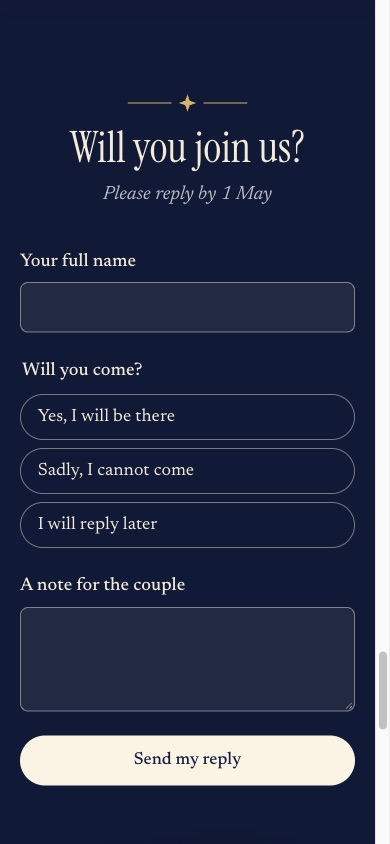
The form opens with your own heading (in the sample, "Will you join us?"), then a name field and the question "Will you come?" with three answers. All 5 Luna Invitations designs (Gilded Lily, Belvedere, Keepsake, Velvet Hour, Paper Moon) carry this reply form. Gilded Lily's form has no drink or travel questions; the other four have both.
What can guests answer on a Luna Invitations reply form?
Every Luna Invitations reply form asks two things: the guest's name and an answer of coming, not coming or not sure yet. Guests who choose coming then see the extra questions the couple switched on: a partner's name, children, parts of the day, meal, drinks, travel and whether they need a room. Every form also has a note for the couple, and coming guests can request a song.
In the editor, the Reply form section holds these settings. The ones with choices (parts of the day, meals, drinks, travel) are lists you type yourself; leave a list empty and that question is skipped.
- Always asked: your full name; will you come (coming, not coming, not sure yet).
- Switches: ask for a companion's name; ask how many children are coming; ask whether they need help finding a room.
- Lists you fill in: parts of the day guests can choose; main course choices; drink choices; travel choices (drinks and travel: not on Gilded Lily).
- Always on the form: a note for the couple; for guests who are coming, a song request, plus an allergies box when you offer meal choices.
The extra questions appear only after a guest chooses coming. A guest who is not coming or not sure yet gives a name, the answer and a note.
You can also rewrite the words on the form, such as the heading, the question and the three answers.
How to make a wedding RSVP online with Luna Invitations
Making a wedding RSVP online with Luna Invitations takes four steps. Choose a design and buy it with guest replies. Fill in the editor in your browser, including the Reply form section, and watch the preview change as you type. Publish on your own address on lunainvitations.com. Then send the link yourself on WhatsApp, text, email or any chat, or print the QR code. Replies start arriving as soon as guests answer.
- Open a design's live demo, try it with your own names, and pay $70 for the version with replies.
- Fill in one form: names, date, venue, programme, dress code, questions and photos. In Reply form, pick the questions you want.
- Choose your address (3 to 48 letters, numbers or dashes) and publish.
- Copy the link or download the QR code as a PNG. Luna Invitations does not send the invitation for you; you send the link.
How does Luna Invitations track RSVPs?
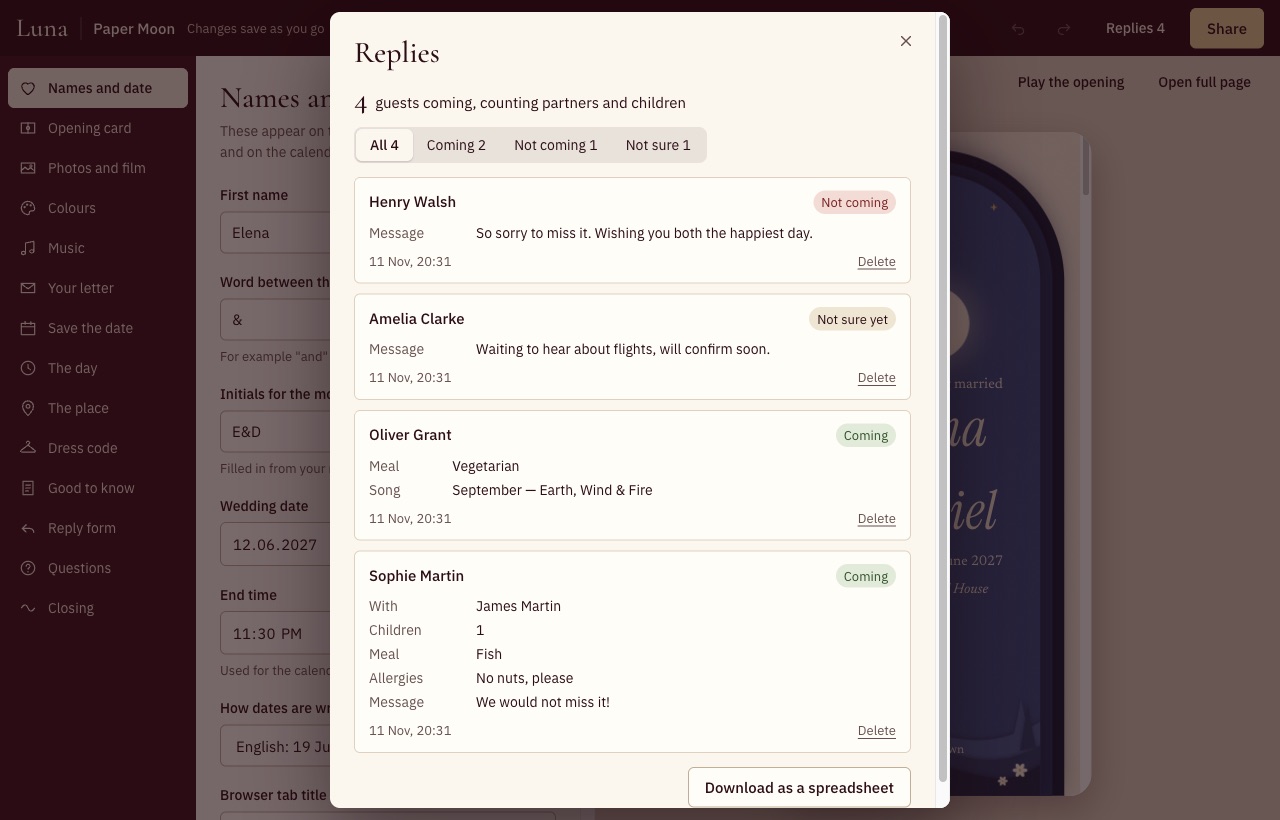
Yes. Every Luna Invitations invitation with replies comes with a private reply list in your editor. The list shows each guest's answer and details, with filters for All, Coming, Not coming and Not sure, and a total line such as "4 guests coming, counting partners and children". The Download as a spreadsheet button saves every reply as a CSV file you can open in Excel, Numbers or Google Sheets.
The Luna Invitations replies spreadsheet has one row per reply and 13 columns: Name, Answer, With, Children, Joining, Meal, Drinks, Allergies, Travel, Staying, Song, Message, Replied.
| Column | What it holds |
|---|---|
| Name | The name the guest typed |
| Answer | Coming, Not coming or Not sure yet |
| With | Partner or companion's name |
| Children | How many children are coming |
| Joining | The parts of the day they chose |
| Meal | Their main course |
| Drinks | Their drink choices |
| Allergies | What they wrote about allergies |
| Travel | Their travel choice |
| Staying | Their answer about a room |
| Song | Their song request |
| Message | Their note to you |
| Replied | The date and time of the latest reply |
Can one Luna Invitations reply include a partner and children?
Yes. On a Luna Invitations invitation, one guest can reply for a small household: their own name, a partner's or companion's name, and the number of children coming, if you switch those questions on. The total in your reply list counts every coming guest plus their partner and children, so a couple with one child counts as three. Other guests reply from their own phones with the same link.
Luna Invitations keeps one reply per guest browser. If two adults want separate replies with separate meal choices, each one opens the link on their own phone.
Can guests change their RSVP after sending it?
Yes. A Luna Invitations guest who opens the invitation again in the same browser on the same phone sees their earlier answer and can change it, for example from not sure yet to coming. The change replaces the old reply rather than adding a second one, and your reply list marks it with the word Changed and the date. Replies close when the guest link closes, 30 days after the wedding date.
On Luna Invitations, a reply sent from another phone, another browser or app, or a private window arrives as a new reply, so a guest may appear twice; you can see both in the list and delete one.
What if I buy the invitation without replies?
A Luna Invitations invitation bought at $50 without guest replies does not take replies: the reply form is switched off when you publish, and guests see the invitation without it. If you want an RSVP form, choose the $70 option, which adds replies for $20. Both options include the same designs, the same animated opening, room for your own song and one link.
Is a free wedding website with RSVP better?
A free wedding website can be the better choice if you need more than replies. Joy and Zola both give couples a free wedding website with online RSVP, registry and guest tools. Luna Invitations is not a wedding website: the RSVP lives inside an animated invitation that opens with a scene and music, for $70 paid once. Pick by what matters more to you, the website tools or the opening moment.
- Joy says "Joy is free to use" and lists Wedding Website, Online RSVP, Unlimited Guests and Hundreds of Digital Invites in its free plan (Joy, Pricing, read 11 Nov 2026). Its RSVP page describes RSVPs for several wedding events, plus-one controls, custom questions about meals and travel, and reminders (Joy, Online RSVP, read 11 Nov 2026).
- Zola says its wedding websites "are free to create and publish", with "Registry, guest list, and RSVPs, all in one place"; a custom domain is extra (Zola, Wedding website, read 11 Nov 2026).
- Luna Invitations has no registry, seating or several-event guest management. It has 5 animated designs, a reply form inside the invitation, a reply list with a total, and a spreadsheet download.
What Luna Invitations can't do
- Guest replies are part of the invitation, not a full wedding website with registry, seating or separate guest lists per event.
- Replies come only with the $70 option; an invitation bought at $50 does not take replies.
- Luna Invitations keeps one reply per guest browser, and does not send reminders; you follow up with guests yourself.
- Luna Invitations does not email or text you when a reply arrives; open Replies in your editor to see new answers.
- The Reply by date is shown to guests, but the form stays open after it until the guest link closes.
- Up to 2,000 replies per invitation.
- The guest link closes 30 days after the event, and the invitation and replies are deleted 90 days after it. Download the spreadsheet before then.
- English only for now.
See the designs
Each Luna Invitations design has a live demo you can open on your phone, and costs $50, paid once ($70 with guest replies).